Designing Custom Keyboard Backlighting
Using QMK to update the firmware on my ErgoDox EZ

Intro
I own an Ergodox EZ, which is a split, columnar keyboard. It does an even better job precluding RSI in my wrists than my old single-board split Microsoft keyboard did. Ergodox EZ keyboards also run open-source QMK firmware, meaning they are extensively configurable! I love my keyboard, but everybody laughs at how silly it looks. :(
The firmware I designed for my Ergodox EZ implements a flashy reactive backlighting and has a keymap designed for C programming with Neovim.
Key Layout & Functions
I use QWERTY but with added thumb keys:
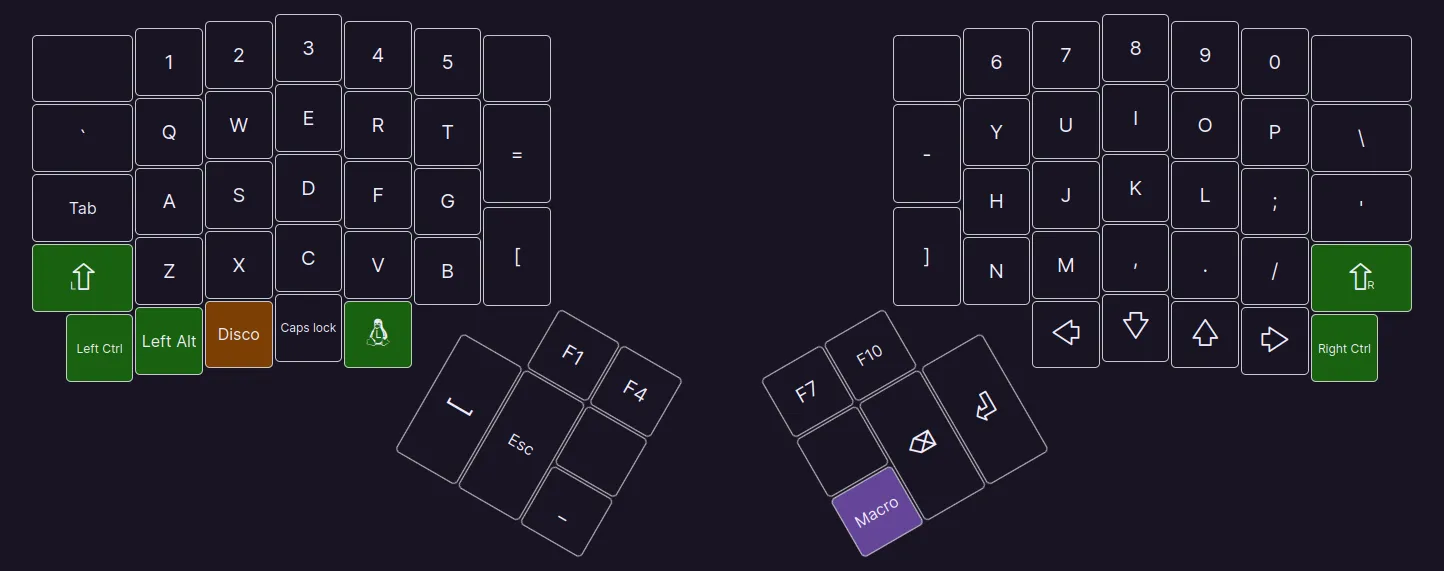
Escape is used to change modes in Neovim, so it sits in an easily accessible spot. I use snake case for variables and types in C, so the extra underscore key next to space makes typing variables much faster. That key with Tux on it is equivalent to the Windows key.
My function keys use QMK's tap dance functionality. I've configured them to output a different key when pressed once, twice quickly, or thrice quickly to use fewer keys for less common keycodes.
Opposite the underscore key sits a macro key that outputs ->, which is a common token in C for accessing struct and union members through a pointer. When I press the macro key, the MACRO keycode is sent, and the process_record_user function shown below intercepts it and uses the SEND_STRING() macro to output ->.
switch (keycode) {
case KC_BSPC:
	if (last)
		unregister_code(KC_BSPC), register_code(KC_BSPC);
	break;
case MACRO:
	SEND_STRING(SS_TAP(X_MINUS) SS_LSFT(SS_TAP(X_DOT)));
	break;
case DISCO:
	disco = !disco, lkeys = rkeys = 0;
}
last = (keycode == MACRO);
This function looks for two other keycodes: KC_BSPC (backspace) and DISCO. When MACRO was the last keycode sent, backspace is released and pressed an extra time to completely erase the -> token. The DISCO keycode intuitively toggles disco mode.
Disco Mode
Solid or breathing backlighting is totally pedestrian, so I implemented my own, special kind of backlighting! It follows the following specification, with each keyboard half working independently of the other:
- Every key press changes the backlight colour
- When all keys are released, the backlights fade out in a nice way
- Backlight LEDs closer to the key pressed most recently will be brighter than those further away
Tracking key presses makes it easy to know when colours should be changed and lights should be faded out. Determining the intensity of each backlight at any given time is a little more challenging. Before I explain how we do that, here is the function that implements my specification:
void
post_process_record_user(uint16_t keycode, keyrecord_t *record)
{
	if (!disco)
		return;

	if (!record->event.pressed) {
		if (record->event.key.row < 7 && lkeys > 0)
			--lkeys;
		else if (record->event.key.row >= 7 && rkeys > 0)
			--rkeys;
		return;
	}

	if (record->event.key.row < 7) {
		lhue = rand() % 256, lval = 255, ++lkeys, lmid = 15;
		if (record->event.key.col != 5)
			lmid = 28 - 2 * record->event.key.row;
		for (uint8_t i = RGBLED_NUM / 2; i < RGBLED_NUM; ++i)
			sethsv(lhue, 255, BASE(lval, i, lmid), &led[i]);
	} else {
		rhue = rand() % 256, rval = 255, ++rkeys, rmid = 14;
		if (record->event.key.col != 5)
			rmid = 27 - 2 * record->event.key.row;
		for (uint8_t i = 0; i < RGBLED_NUM / 2; ++i)
			sethsv(rhue, 255, BASE(rval, i, rmid), &led[i]);
	}
	rgblight_set();
}
The first two if blocks handle disco mode being disabled and key release tracking respectively. The final if block handles key presses and is duplicated for each side of the keyboard. The first line randomly chooses the new colour (lhue = rand() % 255), sets the base intensity (lval = 255), and increments the key press tracker (++lkeys). The second and third line apply a linear transformation to the position of the key pressed to get the index of the closest LED. The fourth and fifth lines choose the colour of all the backlights. Finally, rgblight_set() is run, which actually displays the chosen colours.
Distance Scaling & Cubic Fade
The BASE macro does a lot of heavy lifting. It scales each LED's intensity by its distance to the key pressed and applies a function to fade it non-linearly. Here is the macro:
#define BASE(val, ind, mid) ((uint32_t)(val) * (val) * (val) / 255 / 255) *   \
    5 / (((ind) > (mid) ? (ind) - (mid) : (mid) - (ind)) + 5)
The human perception of light is not linear, but rather follows a logarithmic scale. This means that linear fading doesn't look great to the human eye, so I scale the intensity using a cubic ease-out function: f(x) = x^3 / 65025 (I divide by 255 squared to move the invariant points of the function as the maximum intensity is 255).
Taking the difference between the index of the current LED (ind) and the closest LED (mid) and plugging it into the function f(x) = a / (x + a) gives a scaled version of x that decreases nicely as x grows. a is set to 5 in my implementation of BASE, but can be decreased for sharper scaling.
Result
With a few counters and some math, the backlights react to key presses on each side of the board, fading nicely when all keys are released.
Here is the firmware in action: