Building Custom Keyboard Backlighting
Upgrading my Ergodox EZ using QMK

Upgrading my Ergodox EZ using QMK
I own an Ergodox EZ, a very comfortable, split, columnar keyboard. I bought it because I gave myself carpal tunnel typing on my last keyboard, and I wanted to see if I could type any faster on a split board.1 Ergodox keyboards run open-source QMK firmware, meaning they are extensively configurable for a programmer like me! I love my keyboard, and I would recommend a split keyboard to anybody looking for something more comfortable than a standard keyboard.
My key layout isn’t the main focus of this post, but I wanted to highlight it because it uses some cool features QMK offers.
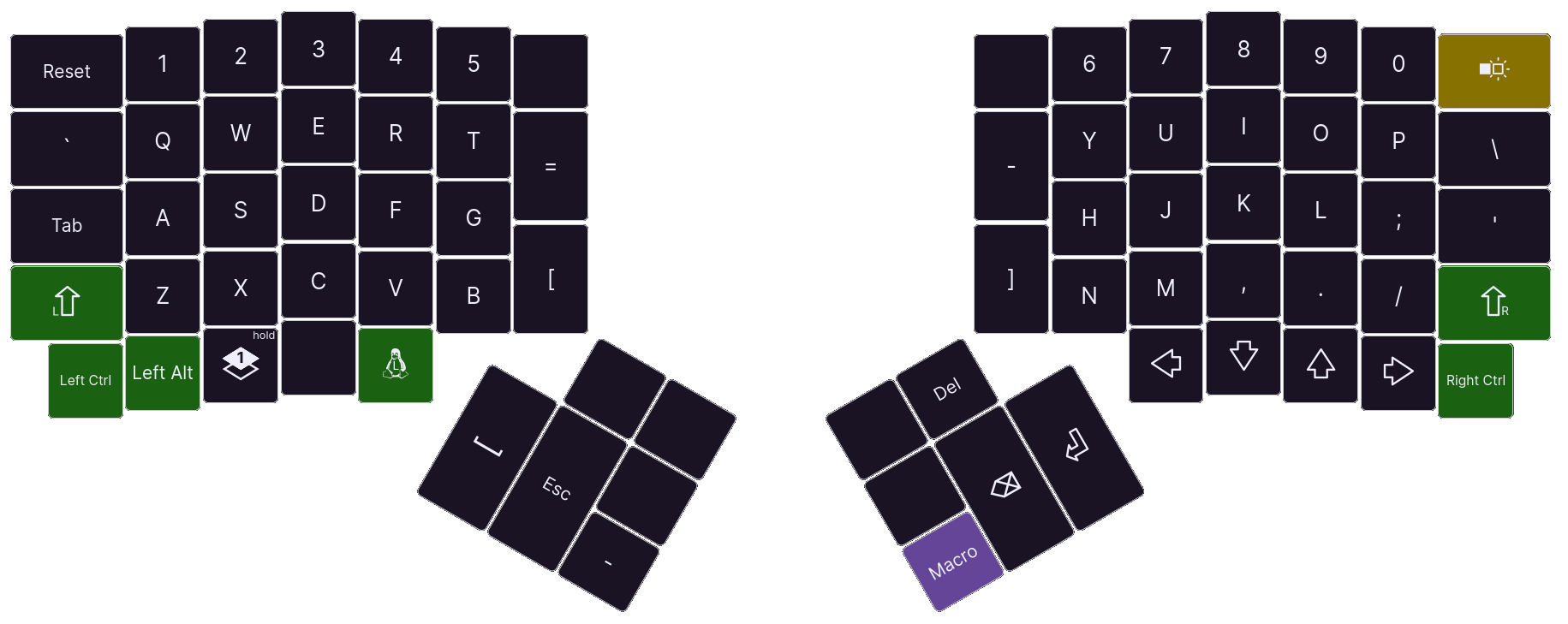
The first thing to notice is that I have plenty of thumb keys for common keycodes. I never really liked that common keys like Enter, Backspace, and Escape2 were off to the side, so I moved them to be more easily accessible.
On the bottom left side, there is a key labelled Layer. QMK has a concept called layers, not unlike how a phone keyboard works: tap or hold a layer key, and access different keys. I use this for my function keys because I use them so infrequently, and I don’t want them wasting space normally.
Finally, I have a key labelled Macro. I commonly type -> when programming, so
I made this key type both characters in a single stroke. I also modified the
handling of the Backspace key so it deletes both characters if the previous
keycode was Macro.
All the default backlighting options provided by QMK are too boring for me, so I rolled my own. It works like this, with each keyboard half operating independently:
Every time a keystroke is detected, the following function runs, tracking which key was pressed and updating the colours:
void post_process_record_user(uint16_t keycode, keyrecord_t *record)
{
    if (!backlight || !record->event.pressed) {
        return;
    }

    if (record->event.key.row < 7) {
        hue_left = rand();
        brightness_left = 255;

        if (record->event.key.col != 5) {
            position_left = 29 - 2 * record->event.key.row;
        } else {
            position_left = 15;
        }

        color(hue_left, brightness_left, position_left, 15);
    } else {
        hue_right = rand();
        brightness_right = 255;

        if (record->event.key.col != 5) {
            position_right = 26 - 2 * record->event.key.row;
        } else {
            position_right = 14;
        }

        color(hue_right, brightness_right, position_right, 0);
    }
}
This function is rather long because I have to control the keyboard halves independently, but the main idea is simple. Every keystroke:
In another function, I keep track of how many keys are pressed at any given time, so I can dim the LEDs once no more are pressed:
if (record->event.key.row < 7) {
	count_left += record->event.pressed ? 1 : -1;
} else {
	count_right += record->event.pressed ? 1 : -1;
}
Now that I track these values, I need to use them to calculate the brightness of each LED:
static void color(uint8_t hue, uint8_t brightness, uint8_t position,
		uint8_t index)
{
    for (int i = index; i < (index + 15); ++i) {
		const uint32_t cube = (uint32_t)brightness * brightness * brightness;
		const uint8_t distance = position > i ? position - i : i - position;
		sethsv(hue, 255, cube / 65025 * 5 / (5 + distance), i);
    }
    rgblight_set();
}
This function takes in a hue, brightness, position, and starting index. There
are 30 LEDs on an Ergodox EZ, meaning that I can pass either 0 or 15 as the
starting index to have the function loop over the right or left LEDs
respectively.
The brightness and position parameters contribute to the brightness of the
LED. First, the brightness is passed through a cubic ease-out function. This
produces a more pleasing dimming as opposed to linearly dimming the LED, as the
human eye senses brightness on a logarithmic scale. Second, the brightness is
scaled down by an amount proportional to its distance from the last key pressed.
The scaling function being used is 5 / (5 + n) where n is the distance in
LED index from the brightest LED, which is not dimmed because its scaling
fraction evaluates to 1.
The sethsv function can then be passed a hue (given as a parameter and
unchanging as the LED is dimmed), a saturation (always the maximum), the value
(or brightness, as just calculated), and the index of the LED. Finally, I flush
my LED settings out to the LED peripheral with the rgblight_set function.
With a little logic, the backlights on each keyboard half act just as I wanted, lighting up reactively and fading when no more keys are pressed.
Take a look!